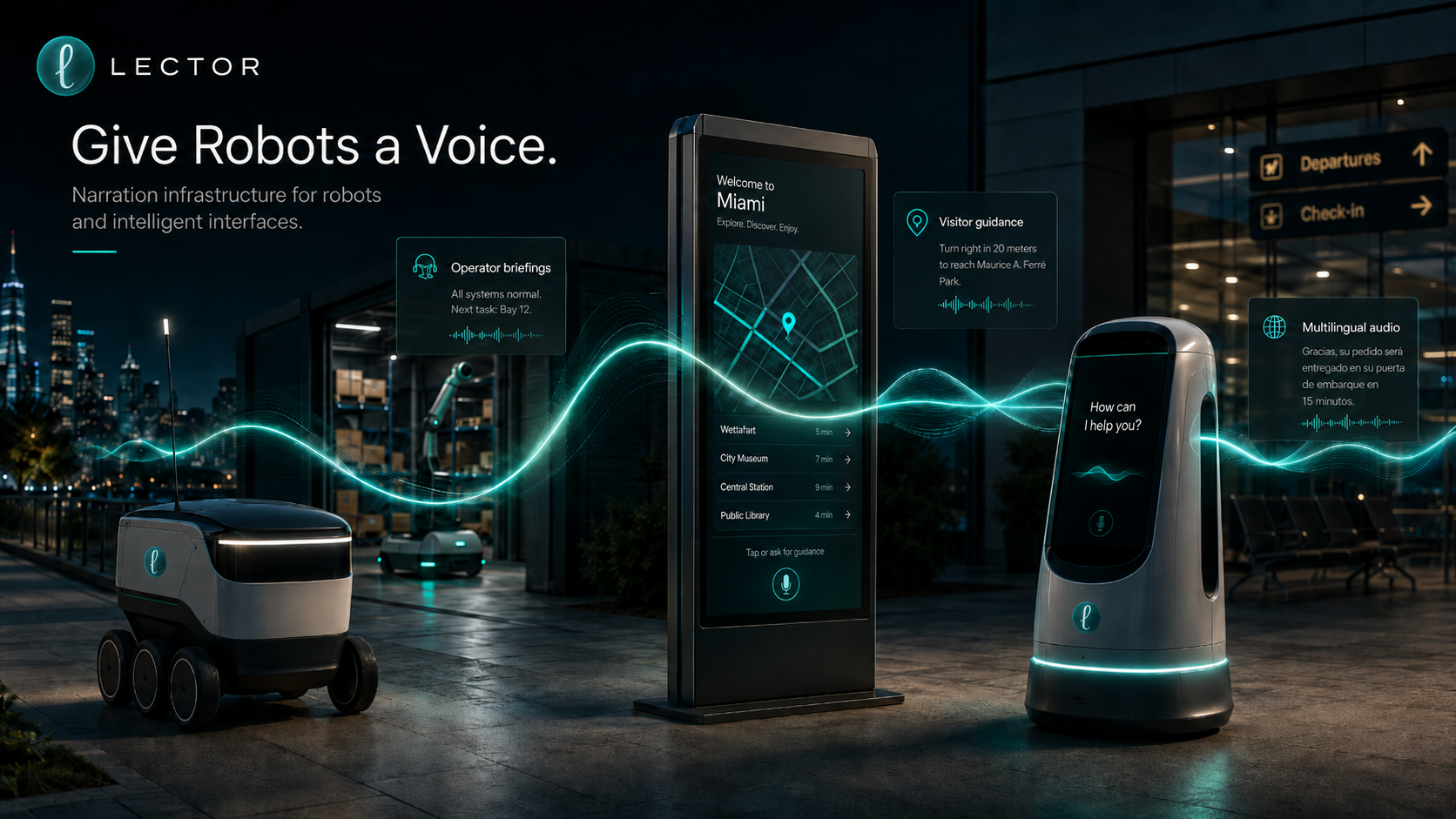
Robotics Teams Already Have Enough to Build
Building reliable robots already means solving:
- Navigation
- Sensors
- Computer vision
- Fleet management
- Safety systems
- Battery optimization
- Hardware
- App integrations
- Operations
- Support
Voice and narration should not become another massive infrastructure project.
Instead of building your own narration, voice, extraction, and audio delivery system from scratch, your team can use Lector as a voice layer for robot workflows. While your team focuses on what they do best, Lector focuses on what it does best: turning information into narration-ready audio.
Robots Need More Than Movement. They Need Communication.
Robots are entering real-world environments: sidewalks, airports, restaurants, hotels, museums, stadiums, warehouses, construction sites, and logistics centers.
But movement is only part of the experience. To be useful around people, robots also need to communicate clearly.
They need to speak to customers, workers, operators, visitors, support teams, and the systems around them.
That is where Lector comes in as a narration layer for robots, agents, and autonomous systems.
It helps robotics teams turn text, URLs, documents, images, instructions, updates, and internal workflows into clear, structured audio.
A delivery robot may know where it is going. But can it communicate naturally with the people around it?
Can a sidewalk delivery robot on Brickell Avenue say out loud:
“Hi, could you please press the crosswalk button for me?”
And then say:
“Thank you. I’m crossing now.”
In English, Spanish, and Creole?
Or in an automotive warehouse:
“The brake pad inventory for Station 3 is running low. Restock is needed before the next repair cycle.”
Can it communicate to a hotel guest:
“Your towels have arrived. Please open the door when ready.”
Or can it help visitors find places and explain directions out loud?
“Bayfront Park is about a twelve-minute walk from here. I can guide you there or show you nearby restaurants, museums, and transit options.”
This is the difference between a robot that simply moves and a robot that can participate in a real human environment.
Tailor Voices for Different Robot Experiences
Different robots need different voices.
- A sidewalk delivery robot may need a friendly, clear, lightweight voice.
- A hotel concierge robot may need a polished, calm, premium voice.
- An airport information robot may need a confident, multilingual, easy-to-understand voice.
- A restaurant robot may need a short, efficient, upbeat voice.
- A museum robot may need a warm, educational voice.
- A warehouse robot may need a direct, operational voice.
With Lector, robotics teams can create voice experiences that fit the environment, brand, and use case. The goal is not just to make robots talk. The goal is to make robots communicate in a way that feels useful, clear, and appropriate.
Lector Can Narrate More Than Simple Messages
Many robot voice systems are limited to short static phrases. Lector is designed for broader information-to-audio workflows.
That means robotics teams can use Lector to narrate many types of content, including:
- Plain text
- Customer instructions
- Public web pages
- Internal support content
- Restaurant menus
- Building access notes
- Delivery instructions
- PDFs
- Short and long documents
- Images
- Screenshots
- Operational notes
- Knowledge base articles
- Multilingual content
- Agent-generated summaries
This matters because robots do not operate in perfect environments. They interact with messy, changing information.
- A customer changes delivery instructions.
- A restaurant updates pickup steps.
- A building changes its access policy.
- An airport gate changes.
- A museum updates exhibit information.
- A hotel changes its guest instructions.
- A stadium changes event flow.
Lector helps turn that changing information into audio that can be used inside real workflows.
Built for Humans, Agents, and Autonomous Systems
Lector is designed for the agent era.
That means its outputs are not only useful for people listening to audio. They can also support systems that need structured information around the audio experience.
For robotics teams, this opens the door to workflows where robots, apps, dashboards, agents, and support systems can all work with the same narration layer.
- A robot can speak.
- A customer can listen.
- An operator can receive a summary.
- An agent can understand the workflow.
- A system can route the result.
That is the power of treating narration as infrastructure.
Why This Matters Now
As robots become more common in public spaces, communication becomes part of the product experience.
A robot that cannot communicate clearly may feel confusing, frustrating, or incomplete.
A robot that communicates well can feel more helpful, more trusted, and more human-friendly.
- For delivery robots, this can improve handoffs.
- For information robots, this can improve guidance.
- For hospitality robots, this can improve guest experience.
- For logistics robots, this can improve operations.
- For accessibility, this can make information easier to understand.
Give your team and robots a simpler way to add audio capabilities to robot workflows.
Robots are not just machines moving through space. They are becoming interfaces.
And interfaces need clear communication. Lector gives robots a narration layer.
Use Lector to:
- Give robots a clear voice
- Create different voice experiences for different robot types
- Narrate text, URLs, documents, and images
- Support customer communication
- Improve operator workflows
- Turn dynamic information into audio
- Support agent-ready and machine-friendly audio workflows
- Make robot interactions easier to understand
Whether your robots deliver food, guide visitors, support hospitality, assist in airports, move goods, or operate across city environments, Lector can help them communicate better.
Robots are learning to move through the world. Now they need a voice for it.
What Kinds of Robots Can Use Lector?
Lector can support many types of robots, interfaces, and autonomous systems.
City Delivery Robots
Food delivery robots, grocery robots, pharmacy delivery robots, and last-mile delivery fleets can use Lector to narrate:
- Arrival messages
- Pickup instructions
- Customer handoff steps
- Delivery delays
- Safety notices
- Support messages
- Multilingual customer updates
Last-mile delivery example:
“Hi Mia, thank you for ordering from Pura Vida. No need to close the lid, it closes automatically after you retrieve your food. Enjoy!”
Restaurant and Airport Delivery Robots
Robots operating inside restaurants, food courts, airports, hotels, and large venues can use Lector for:
- Table delivery updates
- Staff instructions
- Kitchen pickup confirmations
- Guest messages
- Airport terminal delivery updates
- Multilingual food order communication
Table delivery example:
“Thank you for your order. Your order is in and will be delivered to you at Table 10 in 15 minutes.”
Information Robots
Robots in airports, museums, stadiums, campuses, hospitals, hotels, malls, and public spaces can use Lector to speak helpful information to visitors, customers, patients, guests, and staff.
They can use Lector for:
- Directions
- Exhibit information
- Event schedules
- Safety announcements
- Accessibility instructions
- Visitor support
- FAQs
- Multilingual guidance
Museum example:
“This gallery introduces Botero’s early work, where his signature exploration of volume, proportion, and form began to emerge. The next exhibit is located through the archway on your left.”
Sports venue example:
“The Nadal vs. Jovic match is scheduled on Stadium Court. Your entrance is straight ahead on the right. The estimated walk time to your section is four minutes. There is currently a rain delay.”
Public Information Interfaces
Not every intelligent system is a robot.
Kiosks, smart screens, mall directories, city map displays, transit boards, airport displays, and stadium information screens can also use Lector to turn visual or written information into clear audio.
These interfaces can use Lector for:
- Maps
- Transit updates
- Walking directions
- Store locations
- Gate changes
- Event information
- Public notices
- Safety alerts
- Accessibility routes
- Local recommendations
- Multilingual visitor guidance
City screen example:
“The nearest Metromover station is a three-minute walk from here. Walk north on Brickell Avenue, then turn left at the next intersection.”
Mall directory example:
“Zara is on Level 2, near the east wing elevators. Take the escalator ahead, turn right, and walk past the central atrium.”
Airport display example:
“Gate D32 has changed to Gate D40. Follow signs toward Terminal D. Estimated walking time is eight minutes.”
Hospitality Robots
Hotel, resort, cruise, and concierge robots can use Lector for:
- Welcome messages
- Room delivery updates
- Amenity information
- Local recommendations
- Check-in guidance
- Guest support
- Multilingual service communication
Concierge example:
“Welcome! The elevators are located to your left. There is a special event tonight for all guests. Join us on the upper deck at 6 p.m.”
Healthcare and Senior-Care Robots
Robots in hospitals, clinics, and care environments can use Lector to support:
- Patient instructions
- Appointment guidance
- Medication reminders
- Visitor directions
- Staff briefings
- Accessibility-friendly audio communication
Appointment guidance example:
“Your appointment is in Suite 204. Please take the elevator to the second floor.”
Retail Robots
Retail robots can use Lector for:
- Product information
- Store navigation
- Promotions
- Inventory support
- Customer assistance
- Accessibility-friendly shopping guidance
Store navigation example:
“The item you are looking for is available in aisle seven.”
Warehouse and Logistics Robots
Industrial and logistics robots can use Lector for:
- Operator briefings
- Workflow updates
- Inventory movement summaries
- Safety alerts
- Maintenance instructions
- Shift handoff summaries
Operator briefing example:
“Zone B has three pending restock tasks and one blocked route.”
Security and Building Robots
Robots used in residential buildings, offices, campuses, and security environments can use Lector for:
- Access instructions
- Visitor guidance
- Building announcements
- Patrol summaries
- Emergency communication
- Maintenance updates
Visitor guidance example:
“Please proceed to the front desk for visitor verification.”