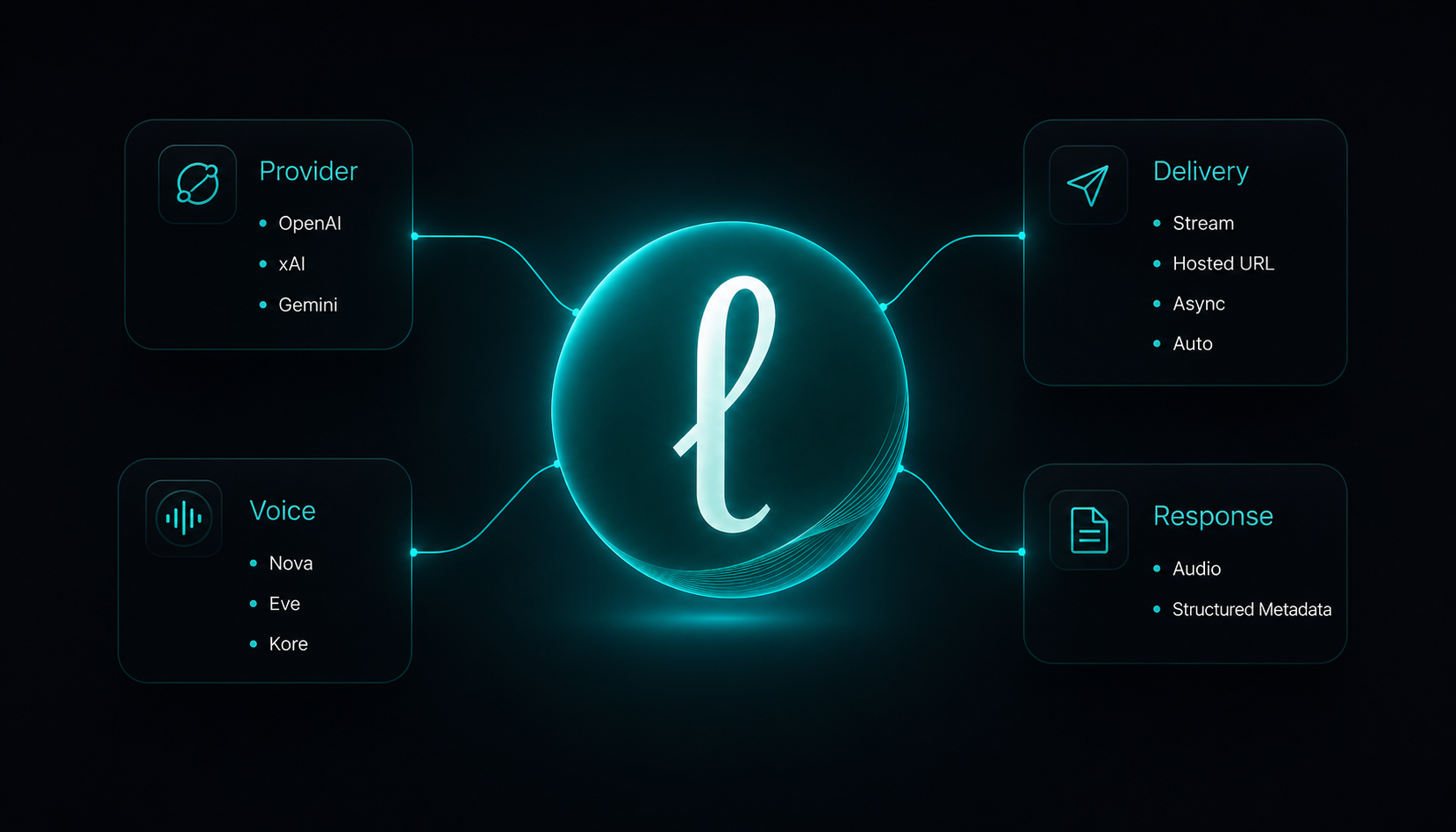
Once your API key is in place, a Lector request comes down to a few practical choices:
- What kind of content are you sending?
- Should Lector use the defaults, or should you choose a provider and voice?
- Should the audio return immediately, as a hosted link, or through a queued job?
- What information will your application or agent need afterward?
Start with the input you already have
Choose the endpoint that matches the form of the content:
- Clean or previously extracted content:
/v1/listen-content - Short text, alerts, or agent messages:
/v1/tts - Uploaded document:
/v1/listen-document - Public document link:
/v1/listen-document-url - Uploaded image or screenshot:
/v1/listen-image - Public image link:
/v1/listen-image-url - Public webpage or article:
/v1/listen-url
Your application does not have to turn every source into the same format before sending it to Lector.
Use the defaults, or make the request explicit
When a request does not specify a provider or voice, Lector currently uses OpenAI and the default voice.
That works well when your product simply needs reliable narration without controlling every detail.
BASE="https://api.lectorai.app"
curl -sS "$BASE/v1/tts" \
  -H "Authorization: Bearer $LECTOR_API_KEY" \
  -H "Content-Type: application/json" \
  -d '{
    "text": "Your weekly report is ready."
  }'
When the voice is part of the product experience, the request can be specific. Developers can choose the provider and voice that best fit the brand, user, interface, or situation.
Current provider access includes:
- OpenAI on Starter, Growth, and Scale
- xAI on Starter, Growth, and Scale
- Gemini on Growth and Scale
curl -sS "$BASE/v1/tts" \
  -H "Authorization: Bearer $LECTOR_API_KEY" \
  -H "Content-Type: application/json" \
  -d '{
    "text": "Welcome. Your room is ready.",
    "tts_provider": "xai",
    "voice": "eve",
    "format": "mp3",
    "delivery": "url"
  }'
Voice selection also helps shape the communication personality of a product. A hotel interface, sports application, educational tool, agent, kiosk, or robot may each call for a different voice.
Use the defaults when convenience matters. Be explicit when the voice is part of the experience.
Choose how the audio should return
Lector currently supports four delivery settings: url, stream, async_url, and auto.
Stream
Use stream when playback should begin as quickly as possible. The response body contains binary audio, while request and generation details are returned through HTTP headers.
This works well for interactive applications, agents responding to a user, robots, kiosks, and interfaces where perceived speed matters.
curl -sS "$BASE/v1/tts" \
  -H "Authorization: Bearer $LECTOR_API_KEY" \
  -H "Content-Type: application/json" \
  -d '{
    "text": "Your delivery has arrived.",
    "tts_provider": "openai",
    "voice": "nova",
    "format": "mp3",
    "delivery": "stream"
  }' \
  -D headers.txt \
  --output delivery.mp3
The audio is saved in delivery.mp3, and its response headers are saved separately in headers.txt.
Hosted URL
Use url when the result needs to move through a workflow. Lector finishes generation and returns structured JSON containing a signed audio_url and output.url.
An application or agent can pass that URL to another service, retain it temporarily, share it, or play it later.
curl -sS "$BASE/v1/tts" \
  -H "Authorization: Bearer $LECTOR_API_KEY" \
  -H "Content-Type: application/json" \
  -d '{
    "text": "The approved update is ready to publish.",
    "tts_provider": "openai",
    "voice": "nova",
    "format": "mp3",
    "delivery": "url"
  }' \
  -D headers.txt \
  --output response.json
The initial response includes the job_id and status_url, but not the finished audio URL.
The job can then be checked using the returned ID:
curl -sS "$BASE/v1/jobs/JOB_ID" \
  -H "Authorization: Bearer $LECTOR_API_KEY"
When the job reaches completed, its response includes the hosted audio URL and information about the completed request.
async_url is currently available for:
/v1/tts/v1/listen-content/v1/listen-document/v1/listen-document-url/v1/listen-image/v1/listen-image-url
It is not yet available for /v1/listen-url.
Auto
delivery: "auto" lets Lector choose the current delivery mode for the endpoint.
Auto affects delivery only. It does not choose or change the requested provider, voice, speed, format, pages, reading order, extraction mode, or other explicit settings.
curl -sS -X POST "$BASE/v1/listen-document-url" \
  -H "Authorization: Bearer $LECTOR_API_KEY" \
  -H "Content-Type: application/json" \
  -D auto-headers.txt \
  --output auto-response.json \
  -d '{
    "url": "https://example.com/report.pdf",
    "tts_provider": "openai",
    "voice": "nova",
    "format": "mp3",
    "delivery": "auto",
    "extraction_mode": "auto",
    "reading_order": "ltr"
  }'
Because this is a document-URL request, Lector currently resolves auto to async_url and returns 202 Accepted with a job_id and status_url.
The current auto behavior is:
/v1/tts→ url/v1/listen-content→ url/v1/listen-url→ url/v1/listen-image→ url/v1/listen-image-url→ url/v1/listen-document→ async_url/v1/listen-document-url→ async_url
Omitting delivery is different from requesting auto. When delivery is omitted, the current default is url.
Format and provider behavior
Lector accepts MP3 and WAV requests across its current voice providers, but the generation path varies by provider:
- OpenAI: MP3 and WAV are generated directly.
- xAI: Lector accepts both MP3 and WAV requests.
- Gemini: WAV is generated natively. Short-to-medium MP3 requests are handled through Lector’s audio conversion layer, while longer requests may use OpenAI as a quality-preserving fallback.
Provider behavior can change as integrations evolve. Authenticated applications and agents can inspect /v1/capabilities for the current providers, voices, formats, delivery modes, fallback policies, plan access, and endpoint support.
curl -sS "$BASE/v1/capabilities" \
  -H "Authorization: Bearer $LECTOR_API_KEY"
Applications and agents should still handle runtime validation and inspect each response to confirm the provider, fallback, generation path, and conversion used for that request.
Use the response, not only the audio
Lector returns information your application or agent can use after generation.
Depending on the endpoint and delivery method, the public response may include:
- the request ID
- requested provider and provider used
- selected voice
- provider fallback
- detected language and reading direction
- delivery method and audio format
- characters used
- duration and playback information
- source and document details
- hosted audio location
- generation or conversion information
A human-facing application can display or store those details.
An agent can use them to verify the result, record usage, deliver the audio, save the URL, or continue the workflow.
The complete response fields and stream headers are documented at lectorai.app/docs.
Respect the source
Public webpages, images, and document links must be accessible without a login.
Lector does not bypass authentication, private access controls, or paywalls.
For private dashboards, inboxes, authenticated pages, or content an agent already possesses, extract the content locally and send it through /v1/tts or /v1/listen-content.
A Google Doc can be sent through /v1/listen-document-url when its sharing settings permit anonymous viewing and export:
curl -sS "$BASE/v1/listen-document-url" \
  -H "Authorization: Bearer $LECTOR_API_KEY" \
  -H "Content-Type: application/json" \
  -d '{
    "url": "https://docs.google.com/document/d/DOCUMENT_ID/edit?usp=sharing",
    "tts_provider": "openai",
    "voice": "nova",
    "format": "mp3",
    "delivery": "url",
    "extraction_mode": "auto",
    "reading_order": "ltr"
  }'
Current limits, supported files, document extraction behavior, and public-document examples are available at lectorai.app/docs.
One workflow for applications and agents
A developer can configure Lector inside a product.
An agent can inspect /v1/capabilities, choose the appropriate endpoint, request a provider and voice, select a delivery mode, and use the returned information to continue the workflow.
Both use the same API surface.
For example, an agent can submit an approved operations update as a queued job:
curl -sS "$BASE/v1/listen-content" \
  -H "Authorization: Bearer $LECTOR_API_KEY" \
  -H "Content-Type: application/json" \
  -d '{
    "content": "Approved operations update: the east entrance will close at 8:00 PM. Direct visitors to the north entrance after that time.",
    "source_type": "agent_report",
    "tts_provider": "openai",
    "voice": "nova",
    "speed": 1.0,
    "format": "mp3",
    "delivery": "async_url"
  }'
Lector returns a job_id and status_url. The agent can then check the job:
curl -sS "$BASE/v1/jobs/JOB_ID" \
  -H "Authorization: Bearer $LECTOR_API_KEY"
When the job is complete, the response includes the hosted audio URL together with provider, fallback, usage, source, and delivery information the agent can use in its next action.
Choose the input. Choose how specific the request should be. Choose how the audio should return.
Lector handles the narration workflow.
Explore the API at lectorai.app/api.
Read the documentation at lectorai.app/docs.
Choose the right audio workflow for your application.
Also explore: Your product already knows what to say · Lector for Robotics Teams